
Note: Whenever a candidate's name is removed from the ballot (live question), the candidate should be marked as ineligible in the same election on the Overview page.
Identifying Ranked Candidates
You can confirm if the candidate ranking feature is enabled through two distinct methods:
Click here to view a video on handling ranked candidate votes!
-
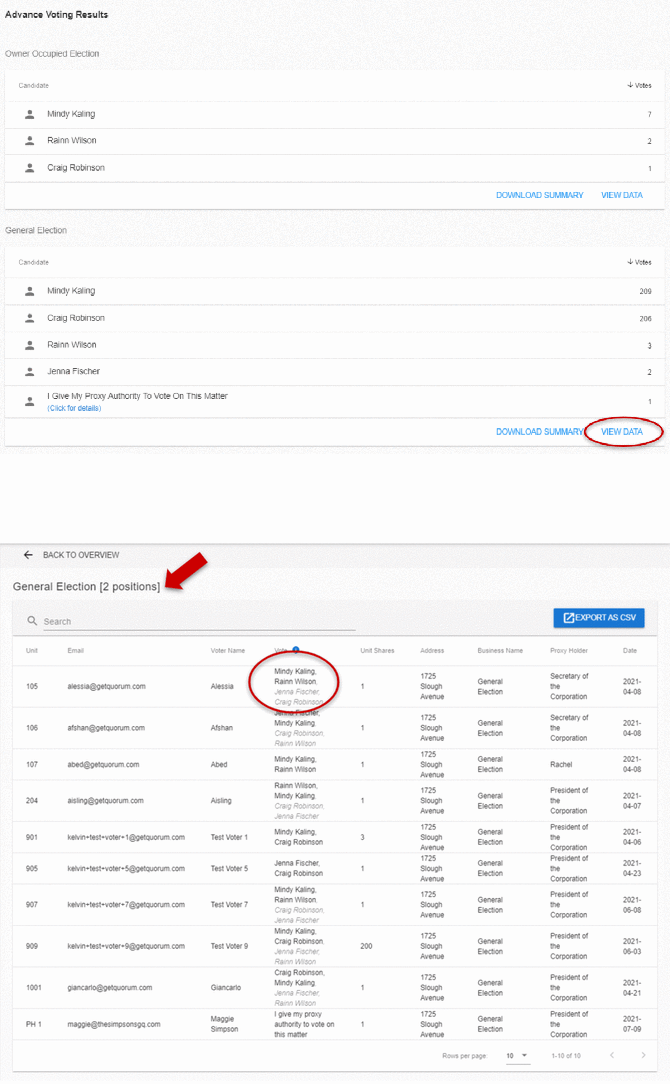
Advanced Voting Results: Check the data fields on the Overview page.
-
Live Voting Toggles: When you switch a candidate's status to INELIGIBLE on the Overview page, the system removes their advanced votes and shifts those totals to the next ranked choices.
Managing Candidate Eligibility
You must mark a candidate as ineligible on the Overview page whenever their name is removed from a live ballot. Failing to do so will cause inaccuracies in the final vote distributions.
When to Change Candidate Status
-
Candidate Withdrawal: Change the status to INELIGIBLE if a candidate drops out of the election. Apply this change across both elections if a candidate is listed on multiple ballots.
-
Multi-Stage Elections: If a meeting has both an owner-occupied election and a general election, the winner of the first election must be removed from the subsequent ballot and toggled to INELIGIBLE on the Overview page.
How to Mark a Candidate Ineligible
-
Navigate to the Overview page.
-
Locate the candidate who withdrew or won a previous election.
- Click the green ELIGIBLE button to toggle their status to INELIGIBLE.
.gif?width=670&height=208&name=file-OAQxJbvkUB%20(1).gif)
Note: The system automatically removes advanced votes from the ineligible candidate and recasts them to the remaining ranked choices in real time.
Common Questions
-
How do I confirm if the ranking feature is active for my Meeting? Contact your Customer Success Manager at support@getquorum.com to verify your setup.
-
What happens if candidate ranking is disabled? Owners can only select up to the maximum number of available positions during advance voting. For example, if there are two available positions and three candidates, owners can only select a maximum of two choices without ranking a third.
-
Does candidate ranking support physical paperwork? Yes. Candidate ranking works with paper allocations provided you have converted your paper proxies into electronic ones.