
Clear the Existing Votes
Before reopening a question, you must permanently wipe all responses already collected for that specific voting matter.
-
Navigate to Questions > View Votes.
-
Select the checkboxes next to the votes you want to clear. Note: You can filter the list by a specific voting question or select all items.
-
Click Reset Answers.
Restart the Voting Period
After clearing the answers, the question will remain available in your active list to be run again.
-
Navigate to Questions.
-
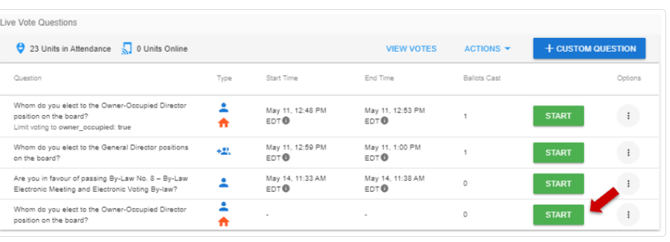
Locate the question copied from the advanced vote section and click Start.
-
Select the duration of time you want the voting period to remain open.
-
Repeat these steps for any other questions if multiple items are included in the same voting window.
Click here to view a video on how to reset and recast a live vote!
Note: The voter portal refreshes automatically for all participants as soon as you restart the vote.
Common Questions
When I reset the votes, will I be able to see the votes from the first run? No. Once you reset a live vote, the cleared data is permanently deleted and cannot be retrieved.