
Overview This guide explains how to set up a functional hybrid Meeting using equipment you likely already have on-site. This setup utilizes two laptops to manage audio, video, and moderation effectively without professional A/V gear.
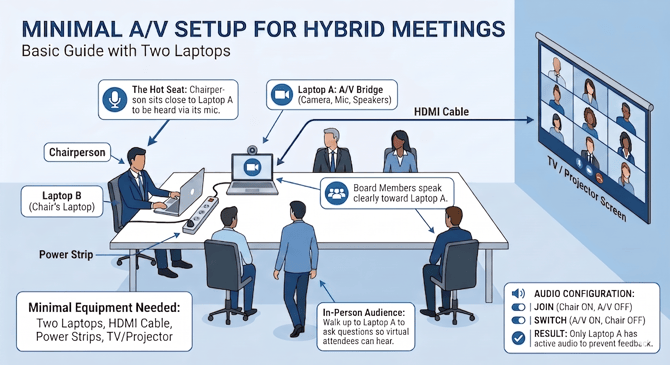
Prerequisites
-
Laptop A (A/V Bridge): Must have a working camera, microphone, and speakers.
-
Laptop B (Chair’s Laptop): Used for viewing the agenda and moderator chat.
-
HDMI Cable: To connect Laptop A to a TV or Projector.
-
Power Strips: Ensure all devices are connected to power sources. Do not rely on battery power.
Room Setup & Placement
Correct equipment placement is critical for audio clarity.
-
Laptop A (A/V Bridge):
-
Place this device at the front of the room.
-
Connect it to the room's TV or Projector via HDMI.
-
Point the camera (or external webcam) to face the Board Members so virtual attendees can see them.
-
Ensure system volume is high enough for the room to hear virtual speakers.
-
-
Laptop B (Chair’s Laptop):
-
Place this device directly in front of the Chairperson.
-
-
Seating:
-
The Chairperson must sit directly next to Laptop A. Because the Meeting uses Laptop A's microphone, the Chairperson must be close to the device to be heard clearly ("The Hot Seat").
-
Configuration Procedure
Follow these steps to initialize the Meeting and prevent audio feedback.
-
Join the Pre-Meeting (Coordination)
-
Laptop B: Join the meeting. Keep Audio ON. Use this time to speak with the Moderator.
-
Laptop A: Join the meeting as "A/V". Turn Camera ON. Keep Audio OFF (Muted) for now.
-
-
Perform the "Switch" (5-15 Minutes Before Start)
-
Laptop B: Mute the microphone and Mute the speakers (system audio) completely.
-
Laptop A: Unmute the microphone and speakers.
Note: Laptop A is now the only active audio device. If any other device unmutes, it will cause loud feedback loops.
-
-
Conduct the Meeting
-
Board Members: Speak clearly toward Laptop A.
-
Audience: If an in-person attendee has a question, they must walk up to Laptop A to speak. Virtual attendees cannot hear questions if the individual speaking is too far from the device.
-