
You must have Moderator permissions to access the Membership settings and manage voter status.
Troubleshooting Membership Issues
Check the Membership for issues preventing users from voting or receiving the vote email.
Troubleshooting Attendee Voting
-
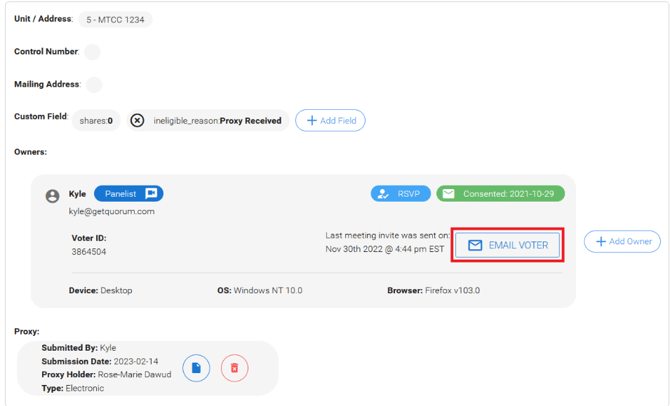
Multi-Unit Owners: Verify if they joined through a unit consolidated to another unit (indicated by noemail@getquorum.com or Shares held under Unit XXX).
-
Attendance Status: Confirm they are properly marked as "In Attendance" in the Membership.
-
Eligibility: Confirm they are eligible to vote. Check for arrears, shares equaling 0, or a custom ineligible_reason.
-
Owner-Occupied Status: Verify if owner_occupied: false status is preventing them from voting.
-
Proxy Submissions: Check if they have an active Proxy submission.
-
Duplicate Voting: Check if they already voted live for the voting matter. Expand the unit to view their voted matters.
Troubleshooting Panelists Voting
Email Verification: Confirm the Panelist email matches their Membership Unit email, if applicable.
Resolving Voting Issues During a Meeting
-
Remind the user to check their email for the vote email sent when the vote started.
-
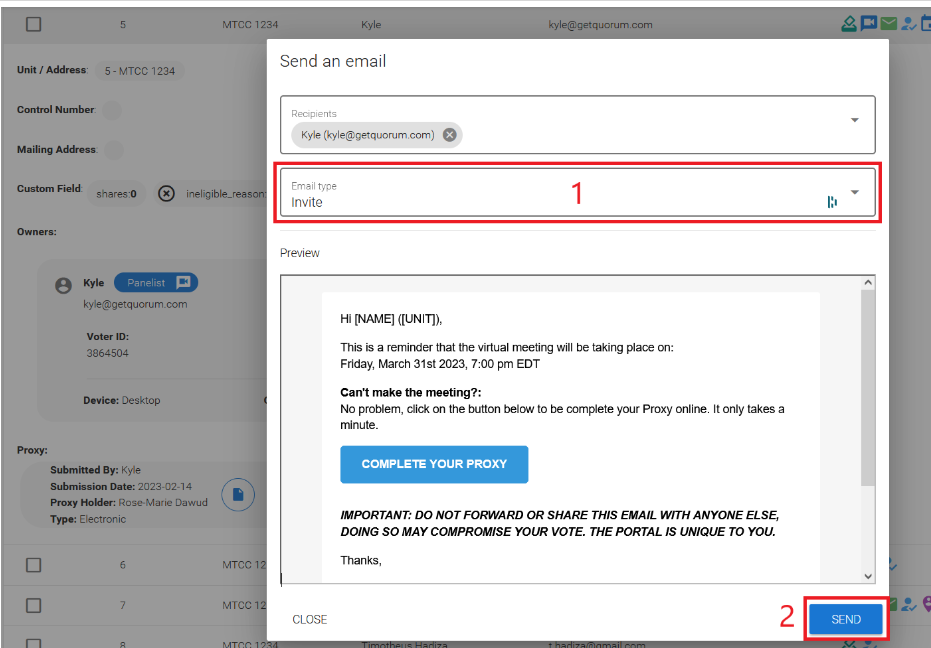
Navigate to Membership > Unit > Owner > EMAIL VOTER > Invite to resend the link to the Meeting portal.
-
Instruct the user to open their original joining email and click Go To My Meeting Portal to reload the Meeting portal.
-
If issues persist, confirm with the Chair and instruct the user to email their votes to voters@getquorum.com.
-
Inform Support and wait for confirmation that the votes have been accounted for.
Important Reminders & Workarounds
⚠️ Warning: Do not private chat the Live Vote URL under any circumstances due to privacy and integrity concerns.
💡 Note: Prioritize accounting for the vote in the system first. However, if voting has already been extended once, gather votes manually to prevent delaying the Meeting. The Chair may decide to move on if the outstanding votes do not impact the outcome.