
Receiving a consent email
Owners will receive a consent email in advance of your meeting or vote, which must be completed at least 14 days prior to the scheduled date.
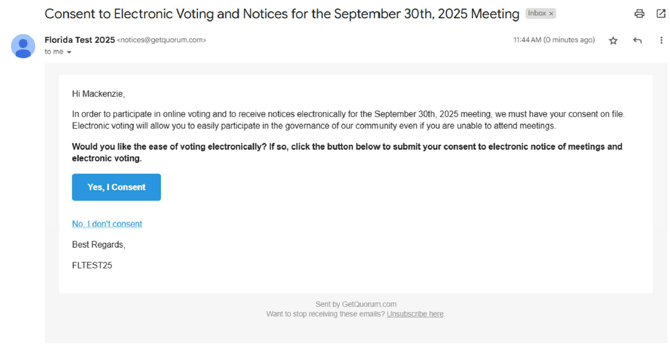
Click either Yes, I consent or No, I don’t consent. If you choose to not consent your consent status will be updated and completed. However, if you choose to consent you will proceed to the next steps.
Steps to Consent to Electronic Voting and Notices
Once you click Yes, I consent, you will be prompted with the following steps.
You will be asked the following questions:
-
Do you consent to receive notices and documents electronically?
-
Do you consent to electronic voting?
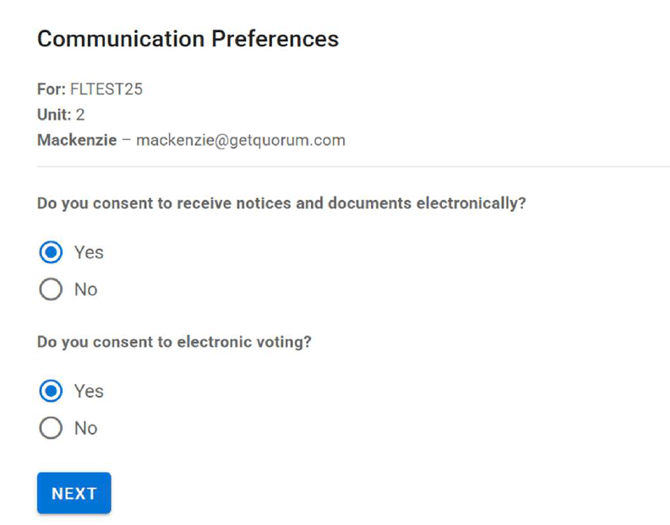
Once you click Next after selecting your options you will be asked to sign your consent form. In order to consent you will need to type your name in the signature box, like below.
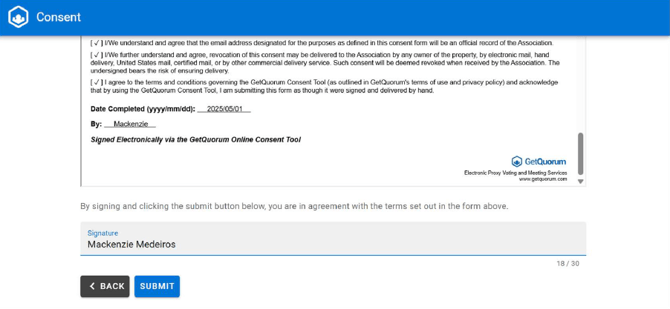
After you type your name in the signature box, you must click Submit. If you do not click submit your consent will not be completed.
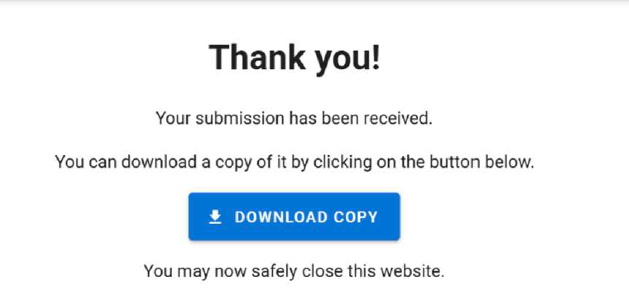
Once you click submit you should see the screen below that will prompt you when it is safe to close the website.
If you have any further questions, please contact voters@getquorum.com.