
Identifying Proxy Holders:
A summary of all proxy holders is located under the Proxies tab. This section includes electronic proxies submitted by owners and paper proxies uploaded to the Dashboard.
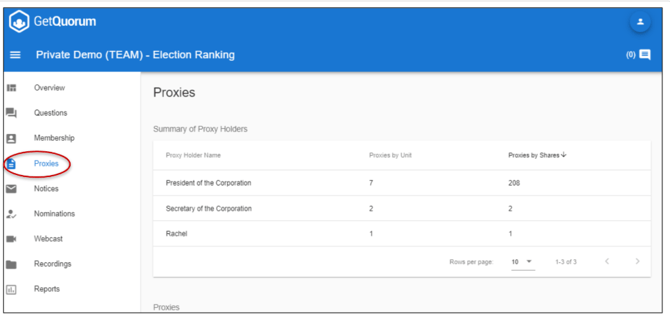
Review proxy metrics using two distinct columns:
1. Proxies by Unit: The total number of units that named this specific proxy holder.
2. Proxies by Shares: The total number of eligible voting shares named to this proxy holder.
Locating Deferred Votes:
Deferred votes most commonly originate from paper proxies. However, if a Meeting has no active candidates, the option to defer votes will also appear on the electronic proxy form.
To verify if your Meeting contains deferred votes:
-
Navigate to the Overview page.
-
Look under each voting matter for the line item: "I Give My Proxy Authority to Vote On This Matter".
How to Handle Deferred Votes During a Meeting:
When a Meeting includes deferred votes, you must manually enter votes based on how the proxy holder votes live. Complete these steps after the live vote finishes:
-
Navigate to the Overview page and confirm the total number of deferred votes in the advance voting summary.
-
Navigate to the View Votes page (accessible from the Overview or Questions page).
-
Search for the proxy holder's name to filter the list and see how they voted. Note their selections.
-
Return to the Overview page and locate the specific voting matter displaying "I Give My Proxy Authority To Vote On This Matter".
-
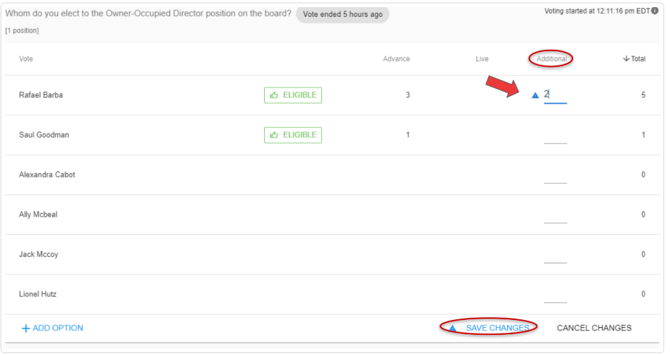
Click the line inside the Additional column for that voting matter.
-
Type and add the manual votes matching the proxy holder's selections. Repeat this step for each voting matter that contains deferred votes.
Click here to view a video on how to handle deferred votes.
Example: If the President holds 2 proxies with fully deferred votes, add 2 votes to the candidate(s) they selected and add 2 votes to the option they selected for the bylaw. The Totals column updates automatically.
Common Questions
What if I am not sure about deferred votes? Contact your Customer Success Manager at support@getquorum.com before the Meeting starts. If you need help during the live Meeting, click the live chat beacon inside the Meeting card to start a session with the support team.
Can I weigh the proxy holder's unit instead of using the additional votes column? Yes, provided the proxy holder has authorization to vote on behalf of the owner for all voting matters. If the proxy holder is authorized to vote on only one specific voting matter, you must use the manual Additional column process outlined above.
Why do I have to manually tabulate deferred votes? Manual tabulation is only required when a proxy is partially instructed. When a proxy is fully uninstructed, you can grant the complete voting share to the proxy holder.
Can owners fully defer their vote to their proxy with the electronic proxy tool? The electronic proxy tool only displays this option if there are no candidates. To fully defer a vote to a proxy when candidates are present, the owner must submit a physical paper proxy or hardcopy to management.
How deferred votes affect attendance numbers for quorum? They do not alter quorum calculations. The system automatically counts all submitted proxies toward the total attendance numbers.