Prerequisites
- Admin access to the GetQuorum dashboard.
- An active Virtual Board Meeting scheduled within the platform.
Inviting Owners to a Meeting
Invite owners, or spectators, by copying the invite link and password for them to access the meeting. You may distribute this information as you see fit (ie. through your regular emailing process). This allows you to copy meeting access information quickly and can be used for troubleshooting or sharing information quickly to a spectator.
Under Meeting Spectators, switch the toggle to Yes to allow spectators to join your meeting. If you’ve changed your mind, switch the toggle off.
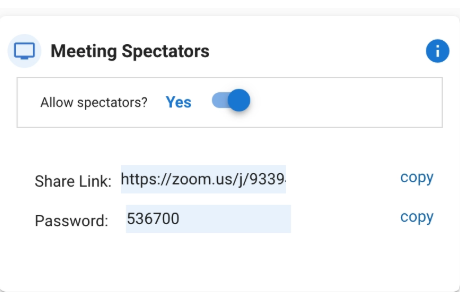
Please note that this is a general link that anyone can use to register and join the meeting. Distribute it at your own risk. However, also note that you can remove attendees as needed during your meeting.
This method will not guarantee spectators will join using a name that matches your records (i.e. an owners list) and may affect the accuracy of any attendance reports. You can encourage spectators to register as accurately as possible and even with a key identifier such as their unit number next to their name [ie. Bart Simpson (123)].
Disabling mic and camera permissions
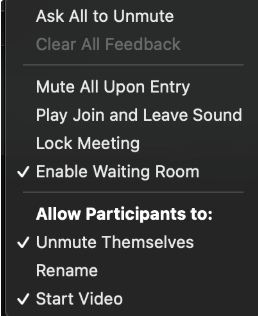
Anyone who joins the meeting through a Spectator invite will join the meeting with the ability to enable their mic and camera.
To manage any restrictions such as unmuting mics and enabling videos please do the following once you launch your meeting:
- Click Participants located in the meeting controls
- Click More then select the options you'd like to allow your meeting attendees to do/not do (ie. Unmute themselves or Start Video)
Disabling chat permissions
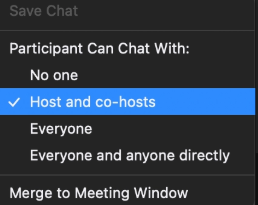
On default, all participants will be able to use the Chat function and send messages to everyone. To limit the scope of how they can chat:
- Navigate to the Chat feature
- Press the 3 dots in the bottom right corner
- Select your preferred option