
1. The Email Invitation
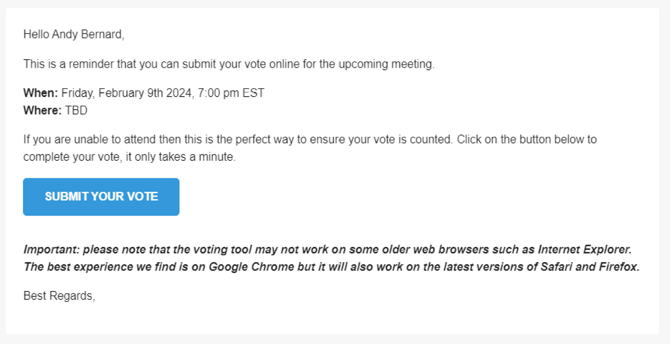
Members will receive an email invitation containing meeting details and a direct link to cast their vote.
-
Sender Information: The email will appear to come from the corporation. If members report they have not received it, advise them to check their spam or junk folders.
-
The Call to Action: The email includes a prominent blue SUBMIT YOUR VOTE button.
-
Browser Requirements: The email includes a disclaimer regarding browser compatibility.
-
Recommended: The best experience is on Google Chrome.
-
Supported: The tool also works on the latest versions of Safari and Firefox.
-
Not Supported: The tool may not function on older browsers, such as Internet Explorer.
-
2. Accessing the Voting Tool
When a member clicks the SUBMIT YOUR VOTE button, a new browser tab will open.
-
The landing page displays information about the meeting.
-
The system allows the member to verify their voting information before proceeding
3. Voting in Elections
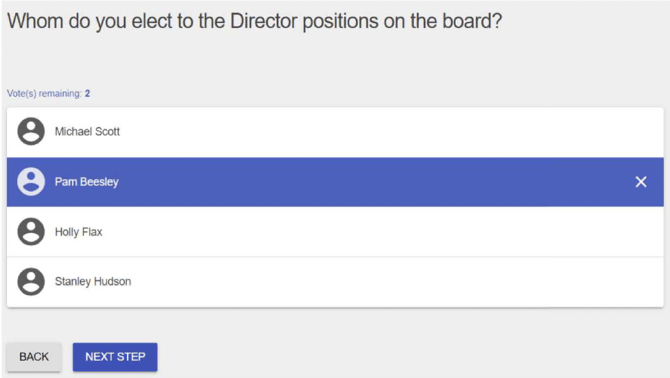
If your meeting involves an election for Director positions, the member will be presented with a candidate list.
-
Selection: Based on the election requirements, members select their preferred candidates.
-
Tracking Votes: The interface displays a "Votes remaining" counter to guide the member (e.g., "Votes remaining: 2").
-
Navigation: Members click NEXT STEP to proceed after making their choices.
4. Voting on By-laws, Resolutions, and Amendments
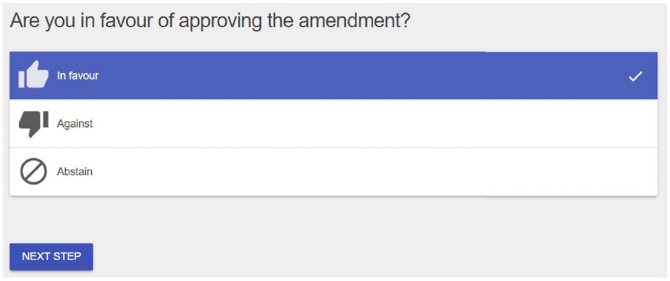
For agenda items requiring approval — such as by-laws, resolutions, or amendments — members will see a specific question (e.g., "Are you in favour of approving the amendment?").
The tool presents three standard options for these items:
-
In favour
-
Against
-
Abstain
5. Review and Submission
Before the vote is finalized, the system provides members with an opportunity to review all their selections to ensure accuracy before submitting.
Voter Support
If your members encounter technical issues or have specific questions about the voting platform, please direct them to email voters@getquorum.com.